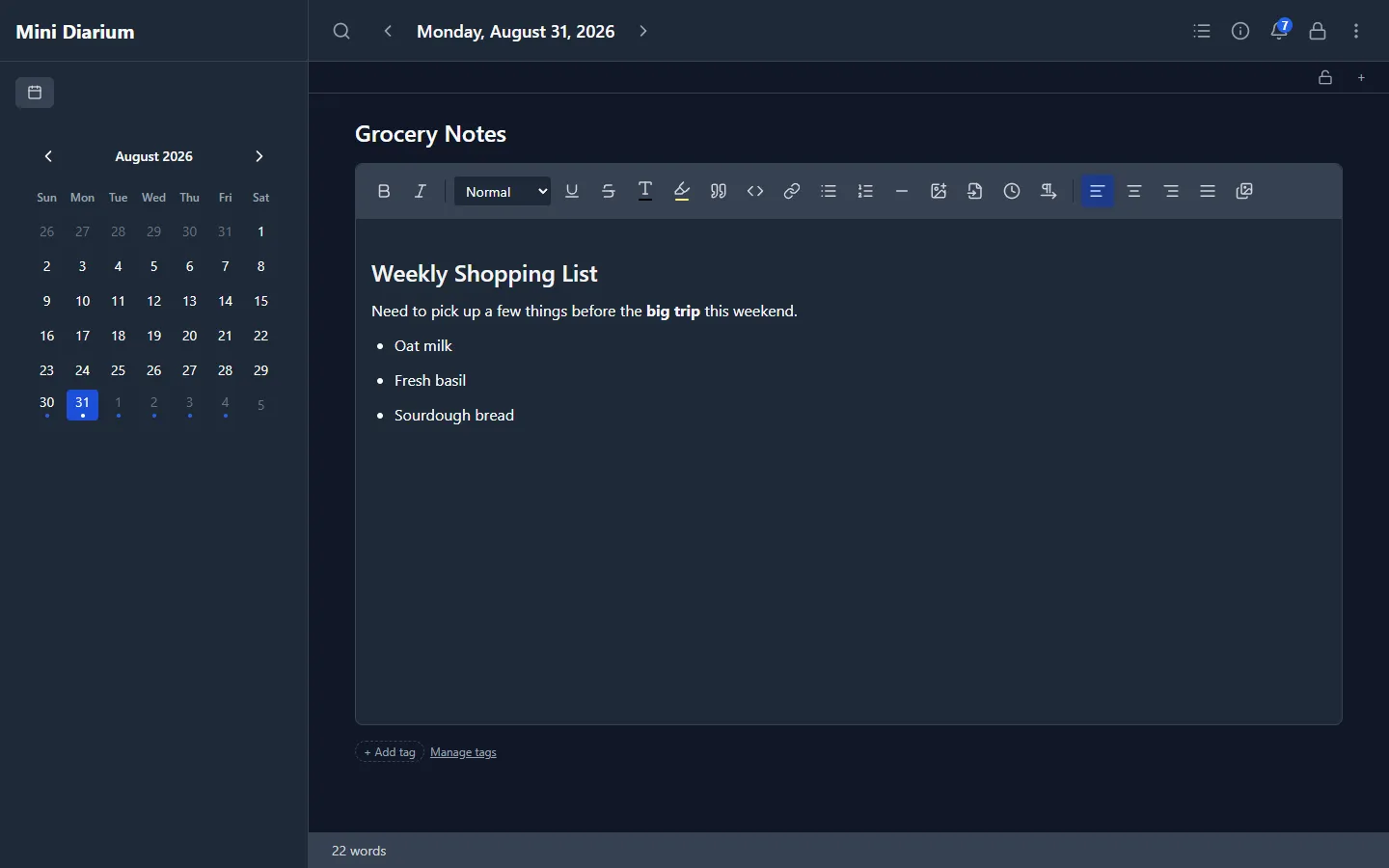
Mini Diarium uses a rich text editor with support for a full set of formatting options:
- Bold and italic text
- Headings (levels 1–3)
- Bullet lists and numbered lists
- Blockquotes
- Inline code and code blocks
- Strikethrough and underline
- Horizontal rules
- Links
- Images (drag-drop, paste, or file picker)
The toolbar above the editor provides buttons for each formatting option. Standard keyboard shortcuts also work: Ctrl+B for bold, Ctrl+I for italic, and so on. On macOS, use Cmd instead of Ctrl.
Titles
Each entry can have an optional title. If you prefer a cleaner look without titles, hide them in Preferences → Writing → Hide Titles.
Multiple Entries Per Day
Each date can contain multiple separate entries. This is useful for writing at different times of day or keeping different threads of thought separate.
- When a date has more than one entry, an entry navigation bar appears above the editor.
- Use
←and→to step between entries, or click the numbered buttons (1 2 3) to jump directly to a specific entry. The active entry is shown in bold. - Use
+to create a new blank entry on the same date. - Use
−to delete the current entry. - If a day has only one entry, the navigation bar stays hidden.
Locking an Entry Against Accidental Edits
When you reread an older day from the calendar or timeline, you can lock the entry so a stray keystroke never changes it. Click the lock button in the entry navigation bar to make the current entry read-only, then click it again to unlock and resume editing. The lock control lives only in the editor, not on the calendar or timeline.
A locked entry cannot be edited, deleted, or re-tagged:
- The editor and title field become read-only.
- The formatting toolbar and the delete button are disabled.
- The add-tag and remove-tag controls are hidden. You can still click a tag to filter by it, since filtering navigates without changing the entry.
- The attach, remove, and insert-reference controls for attachments are hidden. You can still save a copy of an attachment.
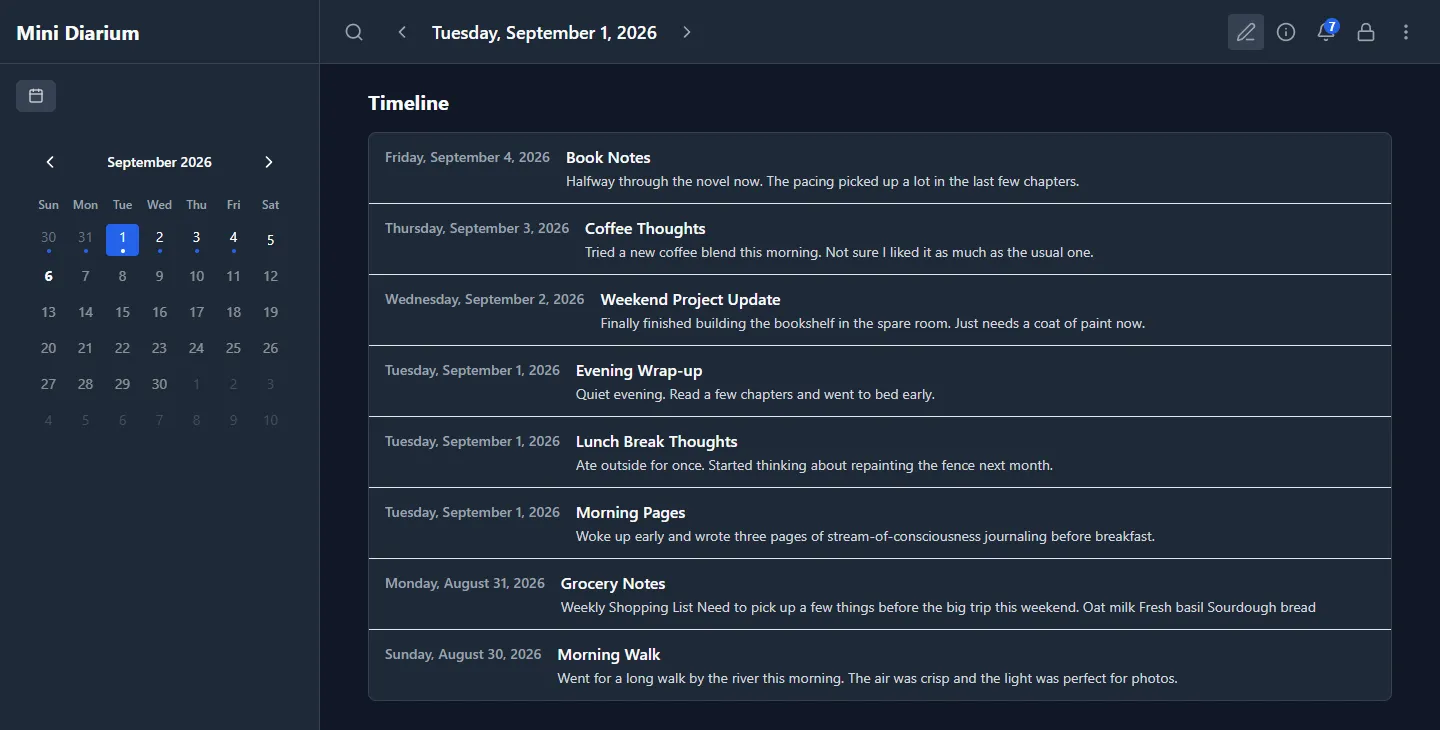
Days that contain a locked entry show a small lock indicator on their calendar cell and their timeline row, so you can see which entries are protected without opening them.
This lock guards against accidental edits. It is not a security feature, and it is separate from the journal's password and auto-lock. The locked state is stored as ordinary, unencrypted entry metadata, so anyone who can unlock the journal can also unlock an individual entry. The lock persists across app restarts and journal unlocks.
Auto-Save
Entries save automatically as you type with a short debounce delay. You do not need to manually save anything. If you clear out an entry completely (emptying both the title and the body), it is automatically deleted after the debounce completes. An entry that has file attachments is never deleted this way, even when its title and body are empty.
Word Count
A live word count is displayed below the editor and updates as you write.
Inserting Images
You can add images to your entries in several ways:
- Drag and drop from your file manager. The editor shows a blue border when you hover a draggable image over it.
- Drag from other desktop apps: images from Electron-based editors (sent as inline
data:image/...base64 payloads) and from apps like Typora that reference images via localfile://paths are both supported. - Paste an image from the clipboard.
- Use the Insert Image button in the advanced toolbar to pick a file.
- Use the Insert Existing Image button to pick from images already stored in the journal (see below).
All dropped or pasted images are resized to a maximum of 1200 px on either side and re-encoded as JPEG or PNG before being embedded. Supported source formats are JPG, PNG, GIF, WebP, and BMP.
How images are stored
Images are encrypted and stored in a dedicated content-addressed table inside the same diary.db database. Each unique image is stored exactly once. If you insert the same image into multiple entries (using the image picker), only one copy is kept. All image data is encrypted with your master key, the same as entry text.
Insert Existing Image
The Insert Existing Image button (stack-of-photos icon) in the advanced toolbar opens a visual picker for images already stored in the journal.
- The picker shows encrypted thumbnails in a grid so you can recognize saved images at a glance.
- Use the Sort control to switch between newest, oldest, and most-used images.
- Use the Month filter to narrow the grid to one month when your journal contains many images.
- A single click selects an image and shows a larger preview with saved date, dimensions, format, size, usage count, and linked entry dates.
- Double-click an image, or select it and press Insert, to place it at the current cursor position.
The selected image is inserted without re-encoding, so the stored copy is reused with no duplication.
Images added before this feature was introduced (prior to v0.5.3) continue to display correctly. Existing saved entries that still embed image data directly are migrated to the new storage the next time their entry is saved. JSON imports that contain embedded data:image/... content are normalized into the encrypted image store immediately during import.
If you drag an image from a web browser, the editor will show a banner explaining that embedding is not possible, because it would require a network request, which the app never makes. Use right-click → Copy Image and paste instead.
Attaching Files
You can attach documents, PDFs, short videos, and any other file to an entry. Attachments appear as chips under the editor, next to the tags. The strip is shown once the entry exists, so type something first on a new day.
- Click Attach file and select one or more files. Each file can be up to 20 MB. Empty files and folders are refused. If one file fails, the others are still attached and the strip tells you which file failed and why.
- Click an attachment's name (or its download icon) to save a copy to a location you choose. The copy must keep the same file extension as the attachment. You cannot save the copy over the journal's own files (the journal database or anything in its backups folder).
- Click the remove (×) icon to detach a file. You are asked to confirm first.
Mini Diarium never opens attachments itself. To view a file, save a copy and open it with another app.
Inline references
Click the insert-reference icon on a chip to place a small 📎 reference at the cursor in the entry text. The reference only points to the attachment; the chip in the strip remains the source of truth. Click a reference to save a copy of its file. With the keyboard, press Tab to move to a reference and press Enter or Space. This also works on a locked entry. If you remove the attachment, its references stay in the text and show as a missing attachment.
How attachments are stored
Attachment contents and file names are encrypted with your master key inside diary.db, like entry text and images. Each unique file is stored once, even if you attach it to several entries. The file type (for example application/pdf) and the size are stored unencrypted, the same as for images. Saving a copy decrypts the file straight to the path you choose; no temporary unencrypted copy is written anywhere else.
Large attachments make the journal file and its backups larger. Deleting an entry deletes its attachments when no other entry uses them.
Older app versions
Versions before 0.7.4 do not know attachments. If they open a journal that has attachments, they cannot delete an entry that has files. If they edit and save such an entry, they remove its inline 📎 references; the files in the strip are kept. Update Mini Diarium on every computer that shares the journal.
Links
You can insert hyperlinks with custom display text. The visible label and the underlying URL are independent (the [label](url) model used by Markdown and most modern editors).
Inserting a link: click the Link button in the toolbar (chain-link icon) or press Ctrl+K (Cmd+K on macOS). The dialog has two fields:
- URL: the link's target. You can paste a full URL (
https://example.com) or just a bare domain (example.com); the editor auto-prependshttps://for you. Email addresses becomemailto:links and phone numbers becometel:links automatically. - Display text (optional): the visible text. Leave empty to use the URL itself as the visible text; the user will see
example.com(nothttps://example.com) when the domain was typed bare.
What gets inserted depends on what you have selected:
- No selection: the dialog inserts new text at the cursor. If you left the Display text field empty, the URL is used as the visible text; if you typed a Display text, that's used instead.
- Text selected: the dialog replaces the selected text with the link. The Display text field is pre-filled with the selected text. You can keep it as-is (the selection becomes the link label) or change it.
- Cursor on an existing link: the dialog opens with the current URL and Display text pre-filled. You can change either, or click Remove link to strip the link mark and leave the underlying text untouched.
A confirmation message below the fields reminds you of the click-to-open behavior (see below).
Opening a link: a plain click inside a link places the cursor for editing (as in any other editable surface). To open a link in your default browser, hold Ctrl (Cmd on macOS) and click. You can also click the Open link button in the dialog after typing a URL, useful when you want to verify a link before applying it.
Only standard external targets are opened: http, https, mailto, and tel. Unsupported or unsafe protocols are ignored and are not passed to the operating system.
Auto-linking: typing a recognizable URL (for example https://example.com) and pressing space converts it to a clickable link automatically. Pasting a URL onto a text selection wraps the selection as a link to that URL.
Markdown round-trip: links are exported as standard [label](url) syntax in Markdown exports, and re-imported back into clickable links when you import a Markdown file. JSON exports preserve the raw HTML, so the link survives round-trips through that format as well.
Right-to-Left and Bidirectional Text
Mini Diarium supports right-to-left (RTL) writing in Arabic, Hebrew, Syriac, and other RTL scripts. Direction is handled per block: each paragraph and heading carries its own dir attribute, so you can freely mix RTL and LTR content in the same entry.
Auto-detection: as you type, the editor reads the first strongly-directional character in each paragraph or heading and sets the direction automatically. Arabic and Hebrew script trigger dir="rtl"; Latin script triggers dir="ltr". Once a block's direction is set it is locked and will not change if you later add neutral characters (numbers, punctuation, emoji) to the same block.
Manual override: press Ctrl+Shift+D (or Cmd+Shift+D on macOS) to toggle the current block between RTL and LTR, or use the ¶R / ¶L toggle button (pilcrow icon with directional arrow) in the advanced formatting toolbar. This is useful for paragraphs that start with neutral characters such as numbers or quotation marks that the auto-detector cannot classify. The button icon shows the current direction and the direction you will switch to when clicked.
Alignment toolbar: when the cursor is in an RTL paragraph, the alignment toolbar reflects the browser's actual rendering and shows Right as the active alignment (not Left). Clicking an alignment button writes an explicit text-align override as normal.
Persistence: the dir attribute is stored in the encrypted HTML content of each entry, so direction is preserved across save, export, and re-open cycles.
Inserting the Current Time
The advanced toolbar includes a clock button that inserts the current time at the cursor position. Clicking the button opens a popup where you can choose between 12-hour and 24-hour format and select hours:minutes or hours:minutes:seconds precision. Both selections are remembered across sessions.
Editor Font: Three-Level System
Mini Diarium uses a three-level font system so you can control fonts at multiple scopes:
1. App Default (Preferences)
You can change the font used app-wide via Preferences → Writing → Editor font. The selector shows two groups:
- Bundled fonts: five open-source families (Noto Sans, Source Sans 3, Noto Serif, JetBrains Mono, Fira Mono) bundled with the app. Loaded on demand and work fully offline.
- Custom fonts: font files you have uploaded yourself (see below). Only families with at least a Regular weight appear here.
Font family and font size are also available as optional controls in the editor toolbar itself. Enable them in Preferences → Writing → Toolbar items. They appear as compact dropdowns directly in the toolbar, but they now apply inline formatting (see below) instead of changing the Preferences.
2. Entry Default (Per-Entry Override)
When you have the font dropdown enabled in the editor toolbar, two new buttons appear next to it:
- Set as entry default: saves the current font family and size as the default for this entry only, overriding the app default. This is useful when a particular entry needs a different font than your usual preference.
- Clear entry default: removes the entry default and reverts this entry to use the app default.
Entry font defaults are stored encrypted inside the entry's metadata and survive save, lock/unlock, and navigation cycles.
3. Inline Formatting (Selection)
The font family and font size dropdowns in the editor toolbar apply inline formatting to selected text or the cursor. This is different from changing preferences. It wraps the selection in a styled span so different parts of the same entry can have different fonts.
To apply inline formatting:
- Select the text you want to format (or place the cursor where you want inline formatting to start)
- Use the font family or font size dropdown to apply the style
Inline formatting is stored in the encrypted HTML of your entry and exports to JSON with full formatting preserved.
Custom Fonts
You can upload your own .ttf, .otf, .woff, or .woff2 font files from Preferences → Advanced → Custom fonts.
- Regular weight (required) and Bold weight (optional) are uploaded separately. The Bold field is optional; if you skip it, the browser will synthesize bold text from the Regular file, which may look slightly different from a true bold variant.
- A Bold weight missing warning appears in the custom fonts list whenever a family has only a Regular weight uploaded.
- Custom fonts are stored inside your journal (
diary.db) as unencrypted blobs. They travel with the journal to other devices automatically and do not require a separate installation step. - Because fonts are stored in the journal, they increase the size of your database file and backups.
- Uploading a new Regular or Bold for an existing family replaces the previous file for that weight.
- Deleting a custom font family removes all weights immediately. If that font was selected, the editor reverts to System Default right away with no Save required.
Tags
Each entry can have one or more tags. Tags appear as small chips below the editor body.
- Click + Add tag to open a dropdown. Type to filter existing tags or create a new one; press Enter or click Create "…" to save.
- Click × on a chip to remove a tag from the current entry.
- Click Manage tags (at the end of the tag row) to open the Tag Manager, where you can rename or delete tags globally across all entries.
Browsing entries by tag
Click a tag chip's name (not the × button) to activate a tag filter. While a filter is active:
- The sidebar opens automatically so the calendar is visible.
- Calendar dot indicators narrow to show only dates that have entries tagged with that tag.
- A banner above the calendar shows the active tag name and a
×button to clear the filter. - The Timeline view lists only the entries that have the tag. The filter applies to each entry, not to each day: if a day has two entries and only one has the tag, only that one is listed. When no entry has the tag, the Timeline says so.
- On a narrow window, where the sidebar is hidden, the Timeline shows its own banner with the tag name and a
×button.
Click the same chip again, or press × in a banner, to return to the full unfiltered calendar and Timeline. The filter persists across month navigation and is cleared automatically when you lock the journal or delete the filtered tag in Tag Manager.
Click a row in the Timeline to open that exact entry, even on a day with more than one entry.
To see tags in the Timeline itself, turn on Preferences → Writing → Timeline → Show tags. Each row then shows its tags as chips. Click a chip to filter by that tag, and click it again to clear the filter.
Tag names are encrypted with the same key as your diary entries. They are never stored as readable text in the database file.
Importing a Markdown File
The advanced toolbar includes an Import Markdown button. This lets you import a .md file from disk into the active entry. If the entry is empty, the imported content replaces it. If the entry already has content, the Markdown is appended after a horizontal rule separator. File size is capped at 1 MB.