A backup is a snapshot: a complete, ordinary Mini Diarium database file, encrypted exactly like your live journal with exactly the same key. There is no separate backup format. If you can open your journal, you can open its snapshots.
Snapshots are written with SQLite's VACUUM INTO, which rebuilds a clean copy rather than copying the file byte by byte. The copy is flushed to disk, moved into place atomically, and then reopened and checked before Mini Diarium reports it as created. A snapshot that exists is a snapshot that works.
When Snapshots Are Created
| Trigger | When |
|---|---|
| Before a schema migration | Whenever a new version of Mini Diarium needs to upgrade your journal's internal format. This is the important one. |
| Before a destructive action | Resetting a journal, importing a file, removing an authentication method, or moving your journal to another folder. |
| On unlock | After you successfully unlock, if the journal changed since the last snapshot. |
| On lock and on exit | When you lock the journal or close the app, if it changed while it was open. |
Two rules keep this from filling your disk:
- Nothing changed, nothing written. Mini Diarium compares the database's internal change counter against the last snapshot. Opening your journal to read something produces no new snapshot at all.
- At most one automatic snapshot per hour. Explicit actions (a migration, a destructive command) ignore this and always snapshot.
The pre-migration snapshot is the one exception to "backups never get in the way": if it cannot be written, the migration is refused and your journal is left untouched. Proceeding with an upgrade that has no recoverable copy is the one failure you cannot undo.
Backup Location
Snapshots are stored in a backups/{journal name}/ subfolder inside the same directory as your diary.db, where {journal name} is your database filename without its extension (diary by default). Each journal gets its own folder. Default journal directories by operating system:
- Windows:
%APPDATA%\com.minidiarium\backups\diary\ - macOS:
~/Library/Application Support/com.minidiarium/backups/diary/ - Linux:
~/.local/share/com.minidiarium/backups/diary/
If you have changed your journal location in Preferences, snapshots are created in {your chosen directory}/backups/{journal name}/ instead.
If several journals share one folder, each still gets its own backups/{journal name}/ folder, but anyone who browses that folder can see every journal's database filename and backups folder name. Entry content stays encrypted. If those names are sensitive, give each journal its own folder.
Backup Filenames
Each snapshot is named backup-YYYY-MM-DD-HHhMMmSS.db, for example backup-2026-08-04-14h30m07.db. The timestamp reflects local time at the moment the snapshot was taken.
Alongside them sits a manifest.json file recording when each snapshot was taken, why, how large it is, how many entries it holds, and which kinds of credential it accepts. It holds no entry text, no titles, no tag names, and no journal names. Deleting it is harmless: Mini Diarium rebuilds it by scanning the folder.
How Long Snapshots Are Kept
Retention is tiered, so how much history you have does not depend on how often you open the app:
- the 10 most recent snapshots, whatever their age
- one per day for the last 14 days
- one per week for the last 8 weeks
- one per month for the last 12 months
A snapshot that qualifies for more than one tier occupies one slot, not several. A burst of activity in a single afternoon cannot push out last month's copy.
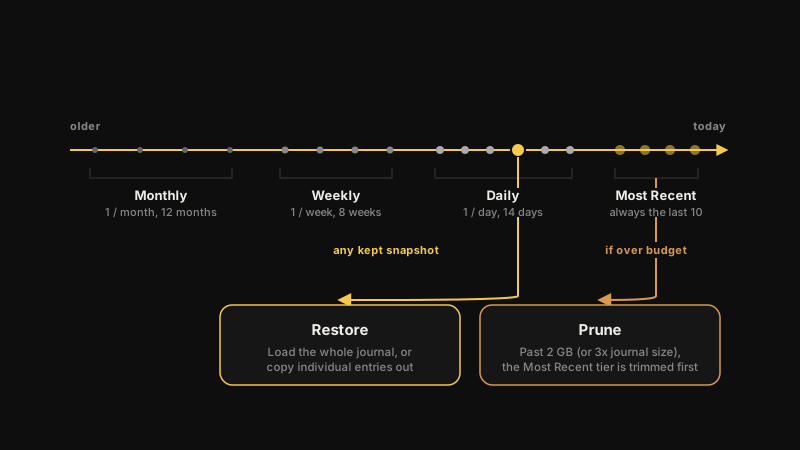
On top of that sits a storage budget of 2 GB, or three times the size of your journal, whichever is larger. If the snapshots exceed it, Mini Diarium thins the most recent tier first and protects the older ones, because those are the ones you cannot recreate.
Only files matching the backup-*.db naming pattern are managed. Anything else you put in the folder is left alone. Snapshots created by earlier versions of Mini Diarium are adopted automatically on first run, not discarded.
Seeing Your Backups
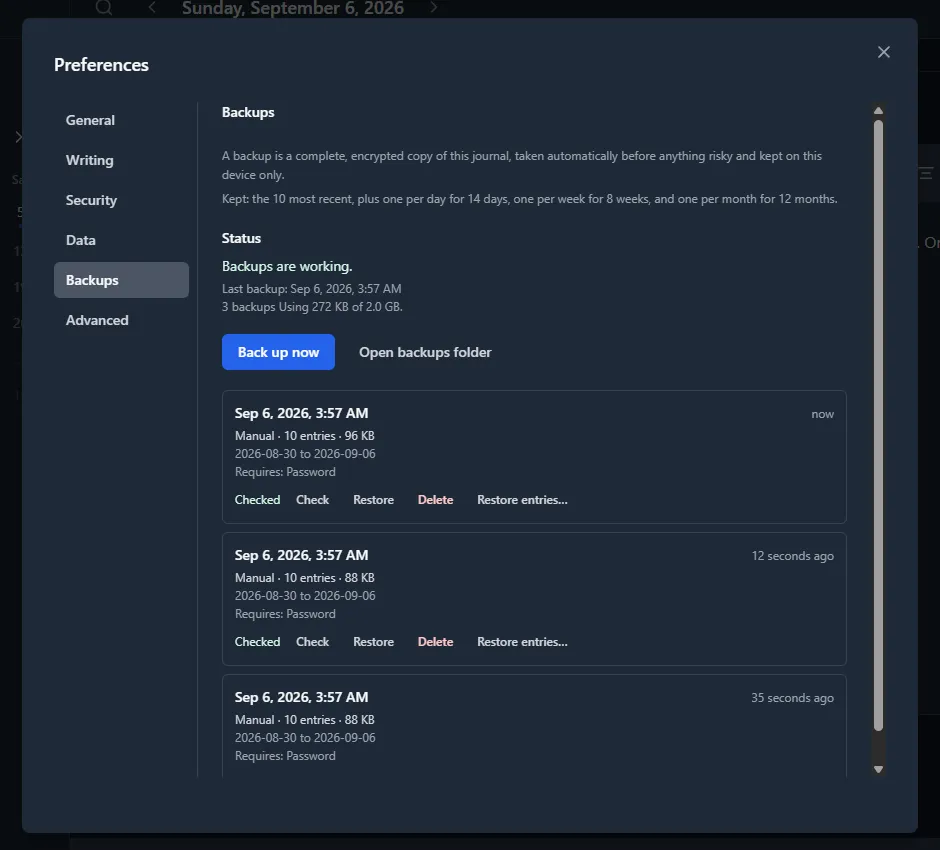
Open Preferences → Backups. The panel lists every snapshot, newest first, with the date it was taken, why it was taken, how many entries it holds, its size, and the range of entry dates inside it.
Above the list is the state of the whole folder: whether backups are working, when the last one was taken, how much space they use against the storage budget, and the retention policy in words.
Four things you can do from here:
- Back up now takes a snapshot immediately. Unlike the automatic ones, it ignores the once-per-hour limit and the "nothing changed" rule, so it always produces a snapshot.
- Check re-opens one snapshot and confirms your journal's key still decrypts every entry's title, text, tags, and any attached images inside it — not just a sample. Snapshots taken by an older version of Mini Diarium start as Not checked, which means "not confirmed yet", not "broken". A snapshot that fails the check is reported, never deleted: it may still open with the credential it was taken with.
- Delete removes one snapshot.
- Open backups folder opens this journal's own snapshot folder in your file manager. It never opens the shared
backups/folder above it. Before the first snapshot exists, there is nothing to open yet.
When the journal will not open
The same panel is reachable from the unlock screen, before you enter anything, via View backups. This is deliberate. The moment you most need to know which backups exist is the moment your journal will not open.
Everything you need to answer "is there a backup, and how recent is it?" still works there, because none of it needs your key: the dates, sizes, and reasons are readable from the snapshots and their manifest without decrypting anything. Entry counts and date ranges are held back until you unlock, so a passer-by at the lock screen learns that backups exist without learning how much you have written or over what span. The actions that do need the key (taking, checking, and deleting backups) are disabled until you unlock.
When something is wrong
The panel replaces "Backups are working." with a plain-language cause when it can find one:
- The last attempt failed. Backups taken as the app locks or exits run in the background, so a failure has nowhere to appear at the time. It is recorded and shown here instead. Open the backups folder and check it is reachable and has free space.
- The folder cannot be used. Usually a journal on a removable or synced drive that is disconnected, so reconnect it. It also covers the case where the backups folder still has an address but nothing usable at it: something else, a file for instance, has taken its place, or the folder itself can no longer be read. That second case is worth stating separately because no failure record can be written into a folder that cannot be written to, so this line is the only warning you get.
- Backups are over their storage limit. Not an error. Mini Diarium trims the most recent snapshots first and keeps the older ones.
Restoring
Restoring is now built into the app, in two forms, both reachable from Preferences → Backups.
Whole-journal restore rolls your entire journal back to the moment a snapshot was taken. Click Restore on a backup: Mini Diarium names the date, warns that entries written since then will be replaced, and takes a safety snapshot of your current state before touching anything — so restoring is reversible even if you picked the wrong one. No password or key file is asked for: a password change only re-wraps your existing key, so whatever unlocked the journal a moment ago also opens every snapshot it ever produced.
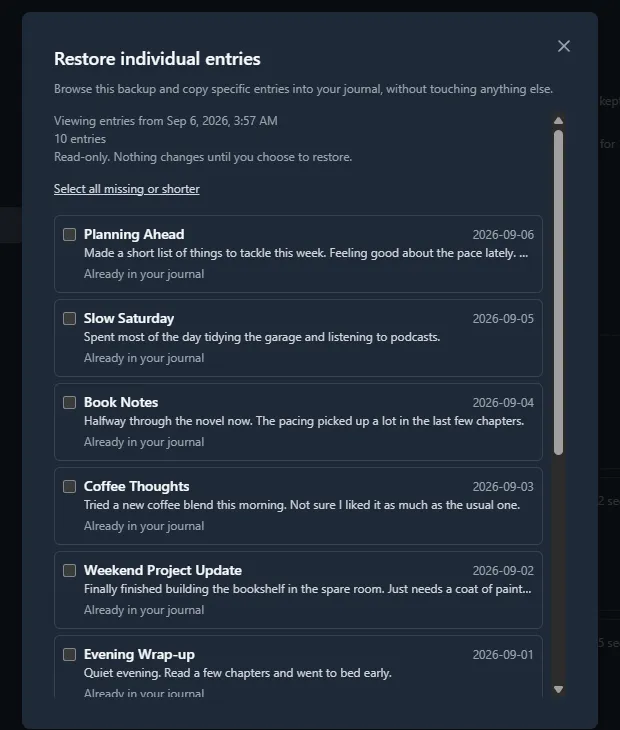
Per-entry restore recovers specific entries without touching the rest of your journal. Click Restore entries… on a backup to browse what it contains. The dialog names the snapshot's date and entry count before listing anything, so you know exactly which backup you are looking at. Each entry is flagged if it is missing from your current journal, shorter there than in the backup, or already present, so it is clear what is worth recovering. Restoring an entry never overwrites anything — it is added alongside whatever your journal already holds for that date — and the result states how many entries were added. Tags, images, and attached files on a recovered entry come back with it. If the backup does not contain an image that the entry refers to, that image is left out and the rest of the entry is restored. Each entry is restored completely or not at all: if part of an entry cannot be restored (for example, one of its attached files is damaged in the backup), that entry is not added, and nothing from it is left in your journal. The restore stops at that entry. The entries restored before it stay, and they are removed from the selection. The entry that failed and the entries after it stay selected, and the dialog tells you that the restore stopped. If you click Restore selected again, only the entries that were not added are restored. An entry that you select again after it was restored is added a second time, because restoring never replaces an entry. This is the one that matters when you only lost a day or two, not the whole journal.
Nothing decrypted is ever written to disk during either kind of restore.
Do not point Mini Diarium at a snapshot where it sits. A snapshot is a working database, so + Open Existing would happily open one — and opening it as a journal writes to it, destroying the untouched restore point. The app refuses backup-*.db files and anything inside a backups folder for exactly that reason. Both restore paths above read snapshots safely; you never need to do this by hand.
Custom Journal Locations
When you move your journal to a different folder via Preferences, diary.db is physically moved to the new location and all future snapshots go into {new location}/backups/{journal name}/. If you have existing snapshots, Mini Diarium asks whether to move them along with the journal.
If you decline, existing snapshots stay in the old folder. Mini Diarium tells you where before the move finishes. If you want to keep that history later, copy the old backups/ folder to the new journal directory by hand.
Cloud-Synced Locations
If you place your journal directory inside a cloud-synced folder (Dropbox, OneDrive, iCloud Drive, and so on), both diary.db and the backups/ subfolder are included in the sync, giving you off-site backup on top of local snapshots.
Keep in mind that Mini Diarium does not coordinate concurrent access. Do not open the same journal from two devices at the same time. The encrypted database file is not designed for simultaneous multi-device write access.
Snapshots Are Encrypted, and What That Costs You
Snapshots are fully encrypted with the same key as your live journal. A snapshot without your credentials is unreadable. That is the point, and it has three consequences worth knowing before you need them.
A snapshot keeps the credentials it was taken with. If you change your password, snapshots taken before the change still require the old password. Keep it somewhere safe, or take a fresh snapshot right after changing it.
Removing an authentication method does not revoke it retroactively. A key file you removed still unlocks every snapshot taken while it was registered. If you removed it because it was compromised, delete the snapshots that predate the removal too.
Local-only journals need this device. A journal with no password is protected by a device-bound key stored in Mini Diarium's config.json, which lives in the app data directory and is not part of the backups folder. Copying the backups folder to another machine is not enough to restore it there. If that matters to you, add a password or a key file to the journal so its snapshots are portable.