Click the ⋮ menu in the header and select Export....
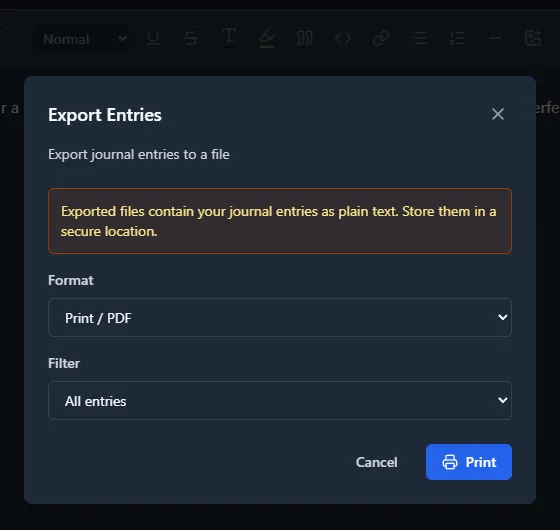
Built-In Export Formats
JSON Export
The JSON format is the primary structural export. It outputs a metadata block and an array of entries under the "entries" key:
{
          "metadata": {
            "application": "Mini Diarium",
            "version": "0.5.0",
            "exportedAt": "2024-01-15T12:00:00Z"
          },
          "entries": [
            {
              "id": 1,
              "date": "2024-01-15",
              "title": "My Entry",
              "text": "<p>Entry content as HTML...</p>",
              "dateUpdated": "2024-01-15T10:05:00Z",
              "tags": ["travel", "work"],
              "metadata": {
                "fontFamily": "Noto Serif",
                "fontSize": 16.0
              }
            }
          ]
        }
Every entry includes a "tags" array (empty [] if the entry has no tags; tags are listed in alphabetical order) and an "attachments" array of { "name", "mime_type", "byte_size" } objects (empty [] when there are none). The JSON file lists attachments by name only; it does not contain the file contents. Entries with font metadata include a "metadata" object containing fontFamily and fontSize; entries without entry-level font defaults have no metadata field.
This format preserves entry IDs, timestamps, tags, and font metadata. It can be re-imported into Mini Diarium. The JSON importer automatically handles both the old Mini Diary date-keyed format and the new array format with optional metadata for backward compatibility. If the JSON contains embedded data:image/... content, Mini Diarium normalizes those images into its encrypted image store during import while preserving the visible content of the entry. Inline attachment references are removed on import, because the attachment files are not part of the JSON file. Stored image references (image-id:// links, which a normal export never writes) are removed the same way, because they name images in a different journal.
Markdown Export
The Markdown export produces a human-readable text file, grouped by date. If a day has multiple entries, each appears under its own sub-heading.
If an entry has tags, a *Tags: …* line is written immediately after the title (or date heading when there is no title) and before the entry body:
## 2024-01-15
        **My Entry**
        *Tags: travel, work*

        Entry content here...
Entries with no tags have no tags line. Tags appear in alphabetical order.
Attachments are written as decrypted files into an assets/ folder next to the Markdown file (named attachment-<n>-<file name>), and each entry with attachments ends with an *Attachments:* list that links to them. Inline attachment references in the text become links to the same files. The assets/ folder contains your attachments unencrypted, like the export itself.
Markdown is a best-effort, text-focused conversion of the stored HTML editor content. Bold, italic, strikethrough, inline code, and links convert to native Markdown syntax. Underline, highlighted/background color, text color, and font family/size have no standard Markdown equivalent, so the formatting is dropped while the text itself is always kept. Complex formatting (tables, images) may not convert perfectly, but the text is always readable. For full-fidelity export including font metadata, use JSON instead.
Print / PDF
The Print / PDF option opens a save dialog and creates a formatted A4 PDF directly at the path you choose.
The print output uses a clean, readable layout with:
- A "Mini Diarium" header and the generation date
- Entries grouped by date, with each date on its own page
- Entry titles, tags (when present), and the full entry content
- The names of an entry's attachments (the files themselves are not printed); inline references show as 📎 and the file name
- Standard formatting for headings, lists, blockquotes, and code blocks
Date range filtering works the same as for file exports. Select "All entries", a custom date range, or a specific month before clicking Print.
If you cancel the save dialog, no file is written. PDF generation happens locally and no data leaves the app.
Why Export?
- Backup: Export a copy of your entries for safekeeping before changing devices or reinstalling.
- Migration: Move your writing to another app or format.
- Archiving: Create a readable offline archive of your journal.
- Processing: Use JSON for programmatic processing of your entries.
Note that exported files are not encrypted. Store them securely if they contain sensitive content.
Custom Export Formats via Plugins
If you need a specific export format not covered by the built-in options, you can write a custom Rhai export plugin. See the Plugins section for details. Custom Rhai export plugins do not receive attachment data.