Press Ctrl+, (or Cmd+, on macOS) to open the Preferences dialog, or click the ⋮ menu in the header and select Preferences.
Preferences are now close-only: there is no Save/Cancel footer. Reversible settings apply immediately as you change them.
General Settings
| Setting | Description |
|---|---|
| Theme | Light, dark, or follow system (auto) |
| Language | Interface language: Chinese (Simplified), English, French, German, Hindi, Italian, Portuguese (Brazil), Russian, or Spanish |
| ESC key action | Do nothing, quit the app, or lock the journal when pressing Escape. Escape has no effect while a dialog is open |
Writing Settings
| Setting | Description |
|---|---|
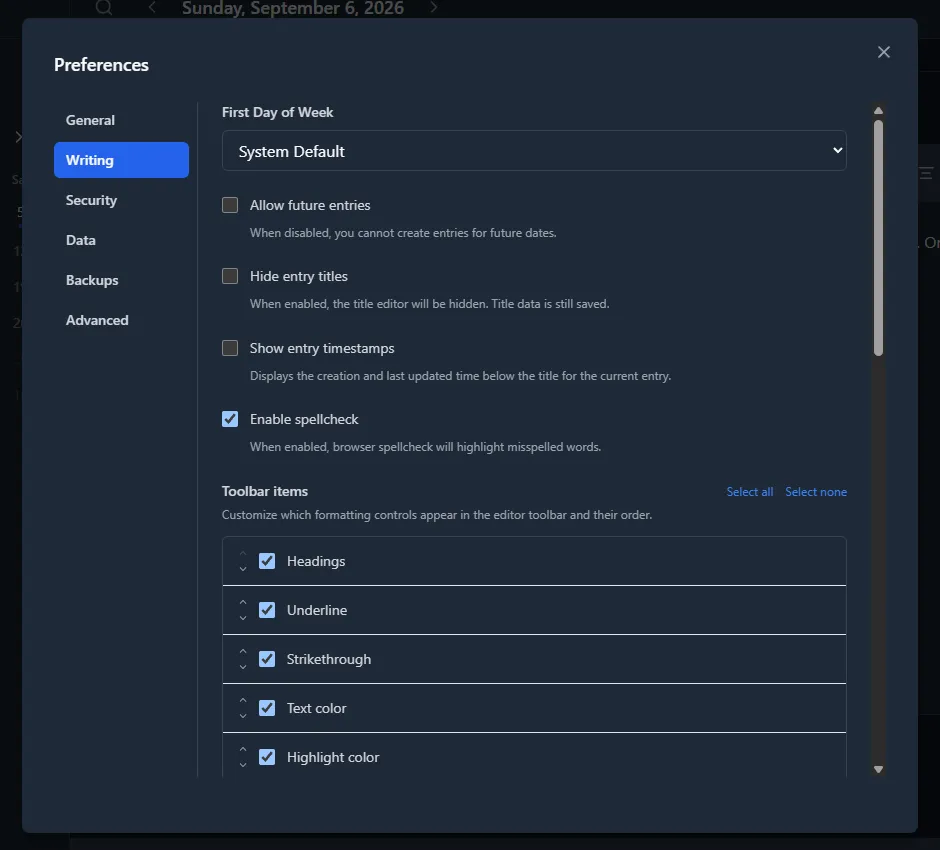
| First day of week | Sunday, Monday, another weekday, or auto-detect from locale |
| Allow future entries | Write entries for dates that have not happened yet |
| Hide titles | Remove the title field for a minimal, distraction-free look |
| Show entry timestamps | Display creation and last-updated timestamps on each entry |
| Spellcheck | Toggle spellcheck in the editor. The dictionary follows your interface language. See "Spell check on Linux" below if you are on Linux |
| Toolbar items | Configure which formatting controls appear in the editor toolbar and their order. Each of the 17 controls (Headings, Underline, Strikethrough, Text color, Highlight color, Blockquote, Inline code, Bullet list, Numbered list, Horizontal rule, Insert image, Import Markdown, Insert timestamp, Text direction, Alignment, Font family, Font size) can be enabled/disabled individually and reordered with ↑/↓ buttons. "Select all" and "Select none" toggle all controls at once. Bold and Italic are always present at the start of the toolbar and cannot be removed. Font family and Font size are disabled by default; enable them to get compact dropdown pickers directly in the toolbar. Note: when enabled, these dropdowns apply inline formatting to selected text (not changing this preference). To change the app-wide font default, use the "Editor font" setting below. |
| Editor font size | Adjust the app-wide default body text size in the editor (12–24 px). When an entry has an entry-specific font default or inline font formatting applied to the selection, those take precedence over this app default. |
| Editor font | Choose an app-wide default font family for the editor body from bundled options or uploaded custom fonts. When an entry has an entry-specific font default or inline font formatting applied to the selection, those take precedence over this app default. See Writing Entries for the full three-level font system. |
| Timeline → Date format | Choose how the date is written next to each row in the Timeline view: Full ("Monday, January 15, 2024"), Long ("January 15, 2024"), Medium ("Jan 15, 2024"), Short ("1/15/24"), or ISO ("2024-01-15"). Every style except ISO follows your interface language; ISO is always YYYY-MM-DD, which keeps the date column a fixed width. Each option in the dropdown shows a live example using today's date. The default is Full. |
| Timeline → Show entry preview | Show or hide the first line of each entry underneath its title in the Timeline view. When turned off, each row collapses to just the date and the title, which fits more entries on screen. On by default. |
| Timeline → Show tags | Show each entry's tags as chips under its row in the Timeline view. Click a chip to show only the entries that have that tag, and click it again to clear the filter. Turn the preview off and the tags on to see tags instead of the first line. Off by default. |
Timestamp format and precision are configured from the editor timestamp popup (clock button), not from Preferences.
Spell check on Linux
Windows and macOS handle spell checking for you. On Linux, Mini Diarium uses spelling language packs installed on your computer. It does not download them automatically, but you only need to add a language pack once.
If Preferences shows a spell-check warning, start with your computer's Software app. Search for your language followed by “spell checking”, such as “Spanish spell checking”, install the suggested language support, then close and reopen Mini Diarium.
Example: Spanish spell checking on Ubuntu or Debian
Using a terminal is optional. If you prefer it, open Terminal (on Ubuntu, press Ctrl + Alt + T) and run:
sudo apt update
        sudo apt install hunspell-es
Enter your computer password when asked. Nothing is shown while you type the password; that is normal. When the command finishes, close and reopen Mini Diarium.
Flatpak
Flatpak installs include dictionaries for eight of the nine interface languages (English, Spanish, German, French, Italian, Portuguese (Brazil), Hindi, and Russian). Chinese (Simplified) has no bundled dictionary, so Linux shows the dictionary warning for it; the interface translation works normally. If you see a warning for another language, open your computer's Software app, update Mini Diarium, and restart it. If the warning remains, reinstall Mini Diarium.
Need more help?
Email [email protected] with your Linux distribution and the language selected in Mini Diarium, or report the problem on GitHub.
Advanced: use another language
To use a language that is not bundled, place its .aff and .dic files in:
- Flatpak:
~/.var/app/io.github.fjrevoredo.mini-diarium/config/enchant/hunspell/ - Everything else:
~/.config/enchant/hunspell/
Name them after the locale you want checked, for example nl_NL.aff and nl_NL.dic. To add
Simplified Chinese spell checking, use zh_CN.aff and zh_CN.dic.
Security Settings
| Setting | Description |
|---|---|
| Auto-Lock | Lock automatically after a configurable idle timeout |
| Lock when the window loses focus | Lock the journal a few seconds after the window loses focus — minimizing, switching to another app, or clicking another window — independent of the idle timeout. Off by default. A brief misclick outside the window doesn't trigger it if focus returns quickly, and opening a native file dialog from within Mini Diarium (export/import/key file) does not trigger this. |
| Change password | Re-encrypt your journal with a new password |
| Authentication Methods | View registered unlock methods; add a new key file or remove existing ones |
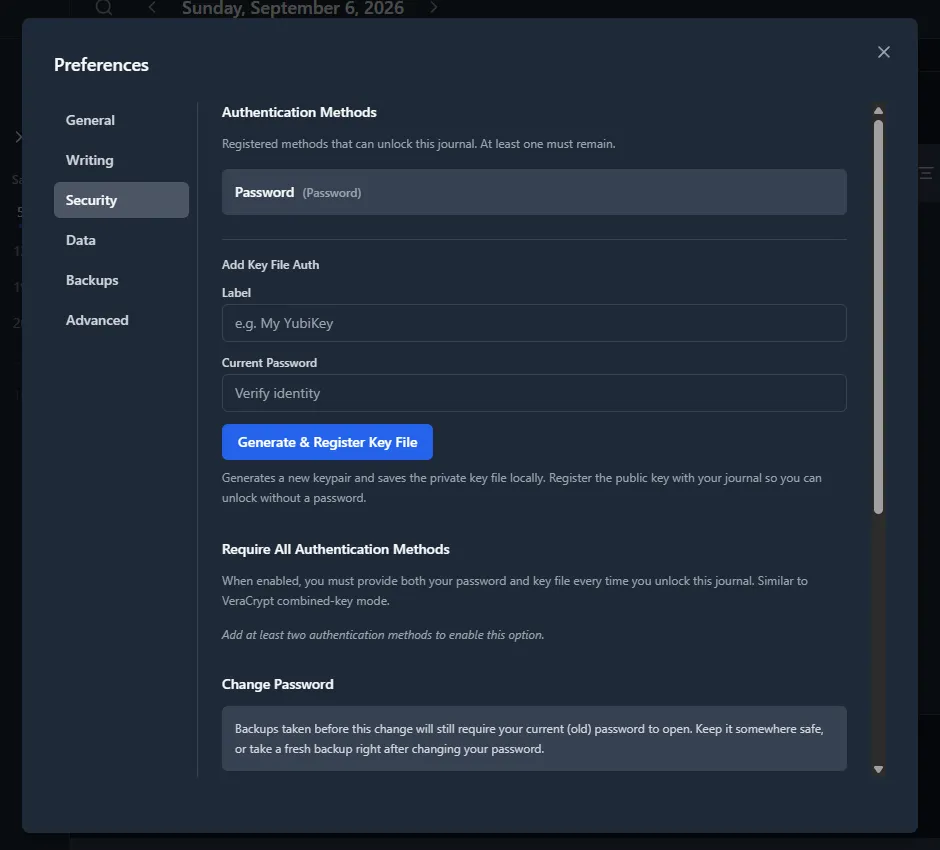
At least one authentication method must remain registered. Removing the last one is blocked.
Mini Diarium also locks the journal by itself if an internal task fails unexpectedly, whatever these settings are. The unlock screen then says so. Unlock the journal to continue. Entries that were already saved are not affected.
Data Settings
You can change your journal's storage location from Preferences. The diary.db file is moved to the new location, and future backups go into {new location}/backups/.
Advanced Settings
| Setting | Description |
|---|---|
| Theme Overrides | Advanced JSON-based CSS token overrides (see below) |
| Custom fonts | Upload/remove custom .ttf, .otf, .woff, or .woff2 font families used by the editor |
| Generate Debug Dump | Export a privacy-safe diagnostic JSON file (see below) |
| Recalculate Word Counts | Rescan every entry and fix any stale word count (see below) |
Custom font upload and delete stay explicit button-driven actions. If you delete the currently selected custom font, the editor font falls back to System Default immediately.
Debug dump
Preferences → Advanced → Diagnostics → Generate Debug Dump writes a single JSON file you can attach to a bug report. Your journal must be unlocked, because most of what the file describes is read from the open database.
What it contains:
| Group | Fields |
|---|---|
| App and platform | App version, Tauri version, debug/release build, OS, OS version, CPU architecture, WebView version |
| Database | Stored schema version, the schema version this build expects, SQLite version, database file size |
| Journals | How many journals are configured, an 8-character prefix of the active journal's id, and per journal: whether it is passwordless and whether it uses the default diary.db filename |
| Security settings | Whether the active journal requires all unlock methods, and whether a deprecated copy of that flag is still in config.json |
| Storage location | Whether the journal appears to sit inside a cloud-sync folder, and which tool it looks like (a name only, never the folder) |
| Entry statistics | Entry count, distinct days written, total words, first and last entry dates |
| Feature counts | Number of tags, tag links, images, image links, images without a thumbnail, custom font families and files, locked entries, entries with metadata, entries without a stored preview |
| Unlock methods | For each: its type (password or key file), when it was created, when it was last used |
| Backups | How many backups exist, the retention limit, the oldest and newest backup filenames, total size on disk |
| Plugins | Number of .rhai script files, and each registered plugin's id, whether it imports or exports, and whether it is built in |
| Spell checking | On Linux only: the resolved dictionary language and whether it is installed |
| Your settings | Your preferences, theme choice, theme overrides, and experimental flags |
| Recent activity | The last 200 app log records and the last 200 in-app log records |
What it never contains: your password, any encryption key, the device key for a passwordless journal, diary entry content, entry titles, tag names, unlock-method labels, journal names, or any file or folder path. Paths are stripped from log records before they are written, and the app deliberately does not record entry-level detail at the log levels that end up in the file.
The file is plain, readable JSON. Open it in any text editor before sending it if you want to check it yourself.
Recalculate Word Counts
Word counts only update automatically when you open and save an individual entry. If you imported entries from another app, or wrote entries before a word-counting fix, their stored word count can go stale until you open each one by hand.
Preferences → Advanced → Recalculate Word Counts rescans every entry in the current journal and fixes any word count that no longer matches its text. Two things it deliberately does not do:
- Locked entries are skipped. A locked entry's word count is left exactly as it is.
- Last-modified dates are untouched. Fixing a stale count is not treated as editing the entry.
This is a manual, on-demand action only — there is no automatic or background recalculation.
Theme Overrides (Advanced)
Advanced users can customize the app's color palette by overriding individual CSS theme tokens.
Open Preferences → Advanced, then enter a JSON object with light and/or dark keys, each mapping CSS variable names to color values:
{
          "light": {
            "--bg-primary": "#fffde0",
            "--text-primary": "#1a1a1a"
          },
          "dark": {
            "--bg-primary": "#0d1117",
            "--text-primary": "#c9d1d9"
          }
        }
Valid JSON applies immediately and is saved automatically. If JSON is invalid, an inline error is shown and the last valid saved overrides remain active. Reset to Default clears overrides immediately.
Overrides are re-applied automatically every time you open the app. They layer on top of the selected built-in theme.
Supported Token Families
| Family | Example tokens |
|---|---|
| Background | --bg-primary, --bg-secondary, --bg-tertiary, --bg-hover, --bg-active |
| Text | --text-primary, --text-secondary, --text-tertiary, --text-muted, --text-inverse |
| Border | --border-primary, --border-secondary, --border-focus |
| Interactive | --interactive-primary, --interactive-primary-hover, --interactive-secondary, --interactive-secondary-hover |
| Buttons | --btn-primary-bg, --btn-primary-text, --btn-destructive-bg, --btn-destructive-text |
| Editor | --editor-body-text, --editor-heading-text, --editor-placeholder-text, --editor-blockquote-border, --editor-link-color |
| Status | --status-success-bg, --status-error-bg, --status-warning-bg, --status-info-bg |
Only documented token names are accepted; unrecognized names are silently ignored. Auth and pre-unlock screens are not affected by theme overrides.
Reset Journal
Preferences → Data → Reset Journal deletes all entries and recreates the database. This is irreversible. Use export to make a backup before resetting.